Release Notes 27.2.17277.0 | February 18, 2026
Requirements
Business Central application platform 27.2 or higher.
MDC web server files version 4.17379.0 (download the files here)
Enhancement
Place Loose Inventory Item into a Package
ID: 14790
A new Package it functions allows users to assign a package to loose inventory items stored in a bin. This enhancement streamlines the warehouse process and improves inventory tracking at the package level.
Add Location Code to Support Printer Selection by User/Location
ID: 14951
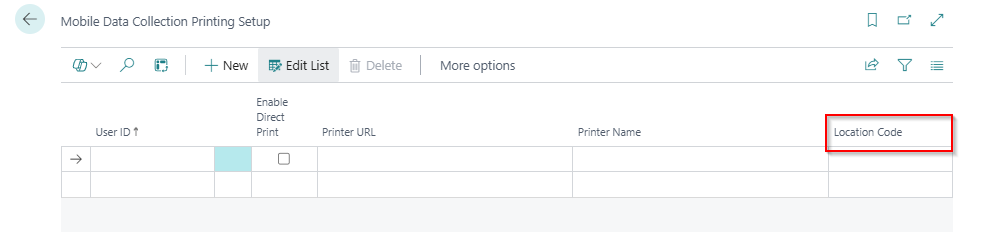
A new enhancement has been introduced to allow MDC users to define default printers by User ID and Location Code. This configuration enables MDC to automatically select the appropriate printer based on the user and the location in which they are operating.
As part of this enhancement, a Location Code field has been added to the Mobile Data Collection Printing Setup page for each user. When a user selects the print action, the system compares the user’s default location with the location code specified in the Mobile Data Collection Printing Setup. If the locations match, the system proceeds with printing automatically.
If the Location Code field is not populated for a user, the system does not restrict printing based on location.
Consumption with LP: Automated Quantity and Lot Determination
ID: 14951
A new enhancement has been introduced to the Consumption with LP page to streamline the consumption process. With this enhancement, once an LP (package) is scanned, the system determines whether the package contains a single item or multiple items.
If the package contains a single item with a single lot, the system automatically prepopulates the Lot No. and sets the Quantity field to the lesser of the remaining required quantity and the available quantity in the package.
If the package contains a single item with multiple lots, the user scans the Lot No., and the system prepopulates the Quantity field based on the lesser of the remaining required quantity and the available quantity for that specific lot within the package.
Fixes
| ID | Description |
|---|---|
| 15122 | An issue has been resolved where the custom label did not display the correct value when posting a partial receipt. The label now reflects the accurate value based on the posted transaction. |
| 14983 | A correction has been made to resolve a spelling error in the system error message displayed during consumption posting. |